


Forum Replies Created
-
 30th August 2021 at 5:46 pm #34419
Hi Aytac,
What I did on my end as we are a college also using this software, is separate students by courses and having Muster just see the course numbers that are going to use the software avoids the 1000 query limit. I think we leave the default rights on our end but there is a person who manages and helps with using the software and its interactions with Maya. I mainly handle the back end.
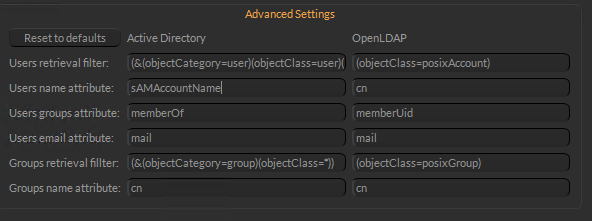
28th June 2021 at 4:23 pm #34401looks like the image I posted is broken and for some reason, I cant edit my reply. Here is another screenshot of the settings config:
 28th June 2021 at 4:18 pm #34400
The best way I found was to toss the users that needed to use the application into a group in Active Directory and had Muster use that to search. I am unsure how many users you need to give Muster access to but the method I found to work was to set the “User Base DN” to where all accounts are located, for example, “OU=All Accounts,DC=domain,DC=domain” then I set the “Group Base DN” to “OU=Muster,OU=All Groups,DC=domain,DC=domain“.Here is what I set up in the Advance Settings:
16th June 2021 at 4:53 pm #34395Here is a stackoverflow topic that is similar to your error: LDAP: ldap.SIZELIMIT_EXCEEDED
16th June 2021 at 4:49 pm #34394Changing the page size is actually a setting in Active Directory not Muster, we to not mess with AD instead narrowed the focus of the search queries to specific groups in specific OUs to avoid the error.
15th June 2021 at 5:03 pm #34391We saw that issue “Size Limit Exceed” when trying to query the entire LDAP directory. You would need to lower the amount it queries, had to configure the advanced settings to get less account when setup.
11th October 2019 at 7:39 pm #23154The T & J columns are cleared, rendernodes are idle and right-clicking on each node purge option is greyed-out. The bar (green on my instance) is moving.
11th October 2019 at 4:21 pm #23144I originally got the Maya 2017 error but looking through the documentations I updated the Maya templates to point to the 2019 install of Maya. After fixing the templates for all the render clients, we submitted a new job with the matching template requirements and are seeing the jobs stuck in queue
8th October 2019 at 3:14 pm #22987Hey Leonardo,
All jobs are getting stuck in the queue, I have checked the supported templates in a few of the clients and they have the Maya Arnold template active. I know I manually configured each render client to the same template as we were seeing errors complaining about Maya2017 so I needed to update to use Maya 2019 render.exe and mtoadeploy 2019.
-


