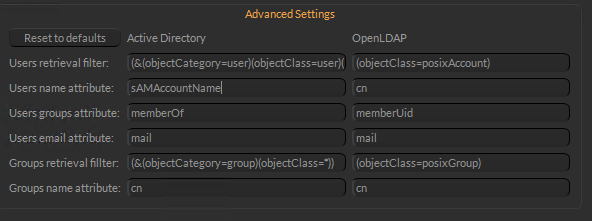
The best way I found was to toss the users that needed to use the application into a group in Active Directory and had Muster use that to search. I am unsure how many users you need to give Muster access to but the method I found to work was to set the “User Base DN” to where all accounts are located, for example, “OU=All Accounts,DC=domain,DC=domain” then I set the “Group Base DN” to “OU=Muster,OU=All Groups,DC=domain,DC=domain“.Here is what I set up in the Advance Settings:
Hi Andres,
I have used a similar solution you have suggested. It works indeed if you create an AD group and add the users to it.
Unfortunately, it doesn’t work if an AD group has more than 1000 students.
What I also don’t understand where Muster saves the Rights from LDAP users and LDAP groups. If I restart the server or restart Muster Dispatcher Service 9, then the Rights set for LDAP users and LDAP groups is lost. Initially, the list of LDAP users and LDAP groups is empty. When I press Update the lists in LDAP users and LDAP groups are populated again but the Rights settings are lost 🙁
What I did on my end as we are a college also using this software, is separate students by courses and having Muster just see the course numbers that are going to use the software avoids the 1000 query limit. I think we leave the default rights on our end but there is a person who manages and helps with using the software and its interactions with Maya. I mainly handle the back end.
We use cookies to ensure that we give you the best experience on our website Cookies are also used to send anonymous browsing data to Google Analytics. We give you the option to Refuse our cookies.


 .
.